Install
Choose Windows Setup or the Apple Silicon macOS DMG above.
One free app for a clear speaker countdown, audience output, OBS overlay, phone viewing and a simple run of show.
Free and open source · no account · no watermark · English and Serbian First-launch help for unsigned builds Find ProTimer on AlternativeToDownload one installer, open the app and put a clean timer in front of your audience.
Choose Windows Setup or the Apple Silicon macOS DMG above.
Open Duration, enter HH:MM:SS or choose a minute preset, then press START.
Only Control opens at startup. Choose a monitor and click Send to screen when you are ready.
Show the view-only Timer or Backstage QR so the audience can follow on phones.
Two screens, independently positioned. Give each timer its own Grid, window size and digit layout — with one clear editing target.
Timer 1 on one TV, Timer 2 on another. Connect both to the same computer as extended displays.
Choose a different grid and cell for each output. Resize one window without moving the other.
One linked Timer 1 / Timer 2 selection for window size, digits and Grid. Extra choices stay hidden when not needed.
Saved placement, combined view, rundown, phone remote, OBS and QR remain available. Startup still opens Control only.
Built from real live-production work — not a generic countdown app.
Plus “count down to an exact time”, color warnings (white → yellow → red) and overtime with a flash at zero.
A transparent Browser Source countdown over your video, with NDI routing available through OBS. Open the OBS guide →
Run the timer over Wi-Fi, put a scannable viewer QR on the stage output, or share a clock-synchronised public link without phone-clock drift.
Move and resize the clean frameless output by mouse, push it fullscreen from Control, or place it in an exact grid cell.
Import the packaged Companion module, build Generic HTTP buttons, or use OSC from QLab and TouchOSC. Open the Companion guide →
A run of show with NOW / NEXT, planned times and an over/under “are we on time?” indicator.
Focused guides for downloading ProTimer, adding it to OBS and controlling it from Bitfocus Companion.
See what is included, which installer to choose and how to put a speaker countdown on a stage screen in about a minute.
Open the free timer guide → StreamingAdd the view-only timer as a Browser Source, make the background transparent and keep control off the broadcast canvas.
Open the OBS guide → Stream DeckImport the packaged module now for actions and live feedback, or build Start, Reset, GO and time-adjust buttons with Generic HTTP.
Open the Companion guide →A focused operator view, a clean audience output and a shared rundown for the crew.
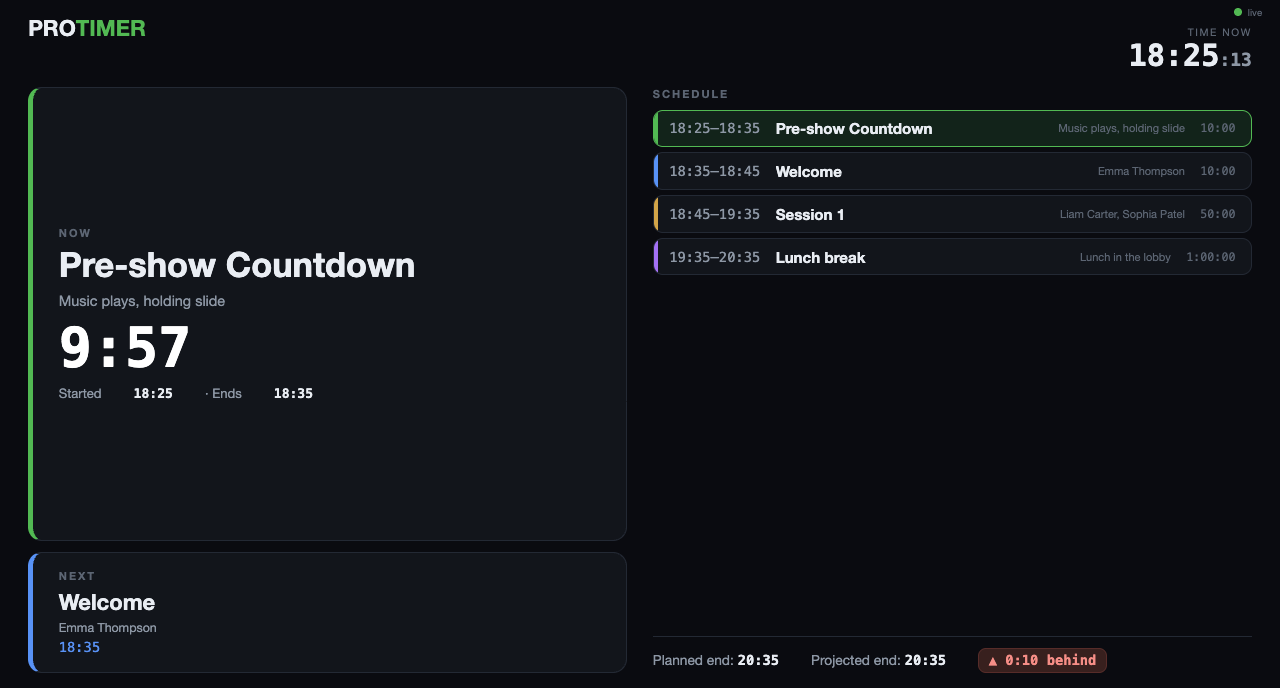
Put the rundown on any screen or phone: what’s live now, what comes next, planned clock times and whether the show will finish ahead of or behind plan.
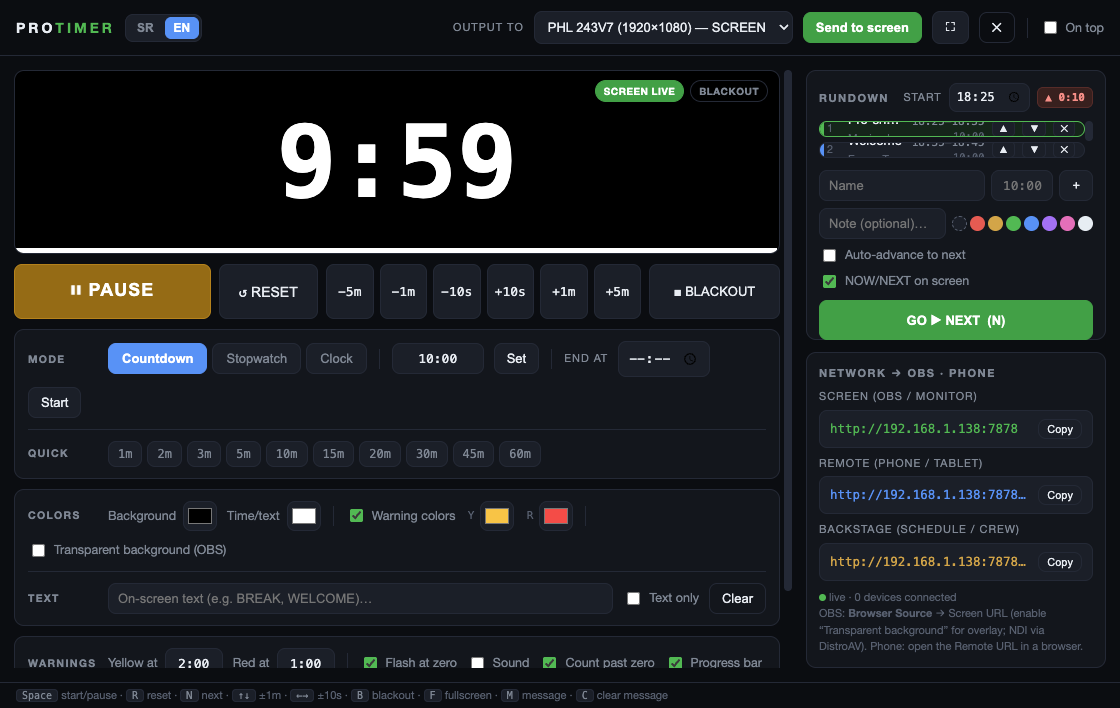
Transport, duration, colors, messages, a scrollable cue-by-cue rundown and links for OBS and phones. The preview stays large and centred while the real stage output can sit anywhere.
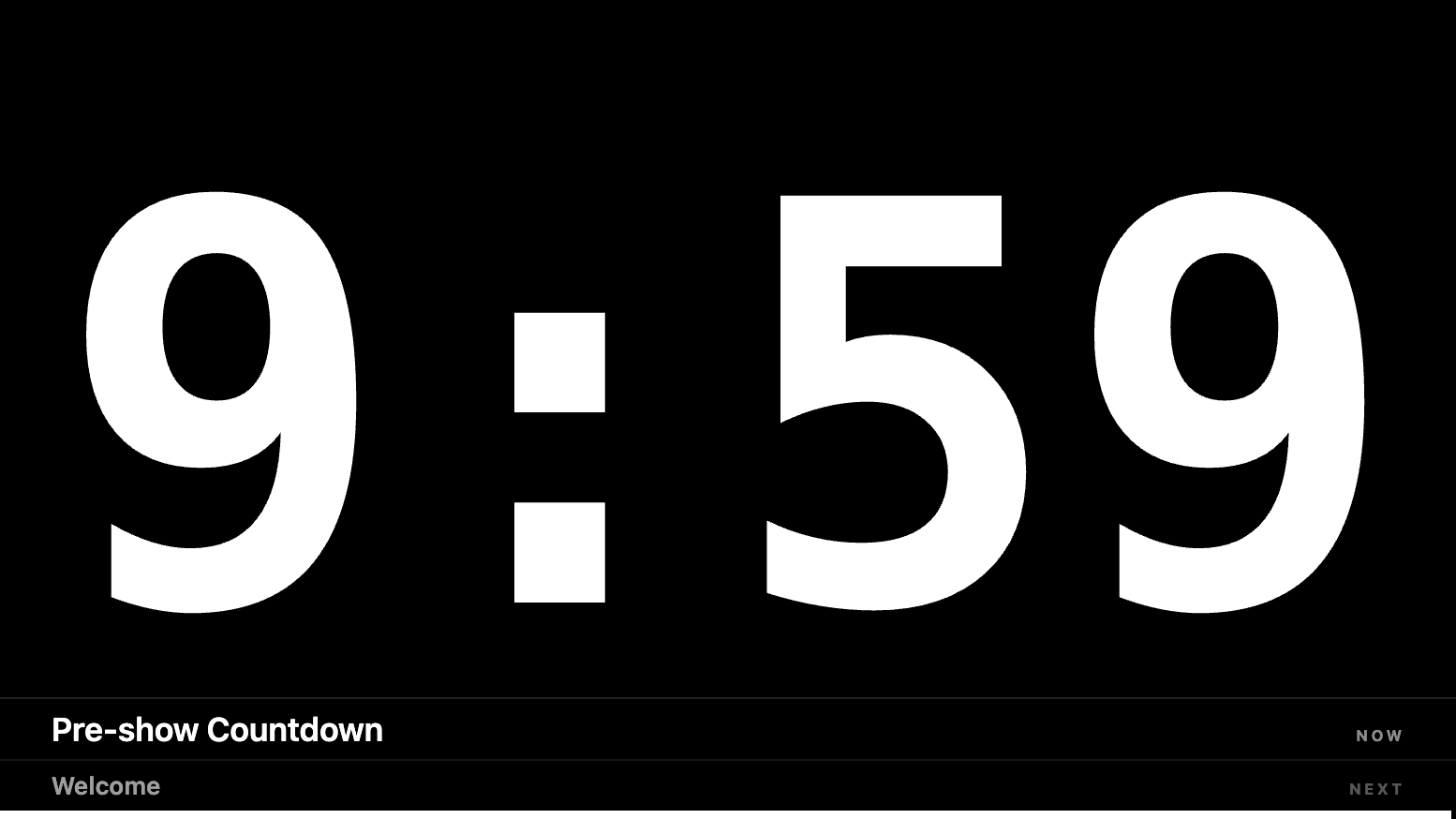
Move and resize the frameless output with the mouse, then switch it to fullscreen from Control. Show a view-only Timer or Backstage QR so the audience can follow on phones.
Start with the workflow you need, then use the checklist or sample rundown during rehearsal.
Add a transparent Browser Source and control it over the venue network.
Prepare the confidence screen, rundown, backstage view, and pre-show checks.
Use named actions, live timer feedback, or the Generic HTTP fallback.
Choose clear thresholds and communicate with the speaker without distraction.
See all guides · Download the sample conference rundown · Open the OBS checklist
Free stage timer, OBS overlay, phone remote — the common questions.
Yes — completely free and open-source under the MIT license. No sign-up, no subscription, no time limit.
Yes. ProTimer serves a web page you add as an OBS Browser Source. Turn on the transparent background and you get a clean countdown overlay over your scene. You can also route it to NDI through OBS.
Apple Silicon Mac users need the DMG. Windows 10/11 x64 users should choose the Setup EXE. Do not download GitHub's Source code ZIP or TAR.GZ files unless you are building the app yourself.
Yes. ProTimer gives you a remote URL for any phone or tablet on the same Wi-Fi, plus a QR code so others can pull up the timer on their own screens.
It’s a free, open-source stage timer that covers the core countdown, OBS overlay and phone-remote use case — a lightweight, no-account alternative for live events, conferences, churches, theatres and streams.
Yes. Bitfocus Companion’s built-in Generic HTTP module handles core actions such as Start, Reset, GO and ±time with no plugin. The dedicated ProTimer module adds presets, variables, and live feedback; install it in Companion 4 with Modules → Import module package.
Yes. Share Online creates a temporary public HTTPS viewer link. It is a beta third-party tunnel, so LAN remains recommended for show-critical use. Anyone with the link can access the timer and backstage rundown, including cue notes, so do not include sensitive information.
Choose one installer. No account, subscription or watermark.
For Windows 10 or 11 x64. Run Setup and follow the installer prompts.
ProTimer-Setup-2.4.1.exe Download Windows SetupFor Apple Silicon Macs with an M1 chip or newer. Open the DMG and drag ProTimer to Applications.
ProTimer-2.4.1-arm64.dmg Download macOS DMGNeed a no-install Windows build? Use the portable EXE. GitHub's Source code archives, YAML files and blockmaps are not installers. Verify SHA-256 checksums.